Separate the data boundaries
I kept real DEFRA profiling separate from the fictional corporate analytics path. This prevents synthetic findings from being presented as public-data facts.
Data Engineering · Analytics Engineering
A controlled analytics pipeline with governed reporting and operational freshness monitoring.
My approach
I kept real DEFRA profiling separate from the fictional corporate analytics path. This prevents synthetic findings from being presented as public-data facts.
I used stable keys, MySQL controls, dbt models, tests, and reporting marts to keep business logic traceable.
I used Airflow, reconciliation, freshness checks, and repeat loads before reporting. The Power BI monitoring page, Grafana, and Streamlit read the same governed monitoring views.
The problem
Spend data is useful only when users can trust its source, transformation, and totals.
Duplicate, incomplete, or inconsistent records can change financial totals.
Repeated loads must not create duplicate records.
A failed or stale load must be visible before users act on the reporting output.
Explore the implementation concepts: dbt modelling → Airflow orchestration → Data freshness →
How the system works
Power BI business pages read governed marts. The Power BI monitoring page, Grafana, and Streamlit read separate freshness audit views.
Design decisions
Each decision controls a specific risk in the path from source data to reporting.
Business logic stays in the governed data layer. Power BI does not recreate the same logic.
A duplicate can contain valid business information. The pipeline does not remove it without evidence.
A rerun must not change record counts or financial totals. Explore idempotency →
Historical data can be valid even when its business date is old. The monitor tests load recency and period completeness as separate controls. Explore data freshness →
Concepts used
The case study shows where each concept sits. The Concept Library explains how it works.
Pipeline reliability
Transformation
Orchestration
Trust
Modelling
Operations
Monitoring
Decision evidence
Business and monitoring views each have one decision job. Every screenshot is evidence, not decoration.
Why this visual exists. The KPI row, time trend, currency mix, and ranked bars separate scale, movement, and concentration.
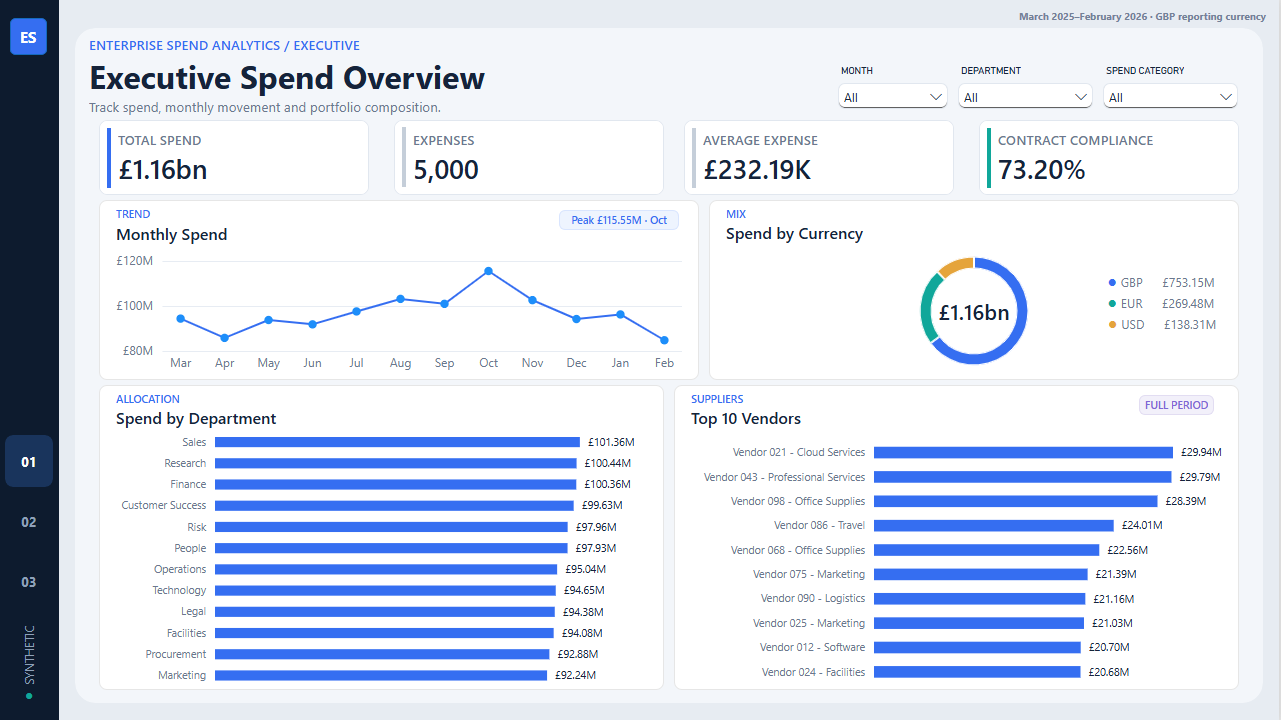
£1.16bn spans 5,000 expenses. Contract compliance is 73.20%, and October has the highest monthly spend at £115.55m.
The overview identifies where to investigate. It does not prove vendor risk or control failure by itself.
Move from the portfolio view to contract and vendor controls before setting an intervention.
Why this visual exists. Exposure by department and category is shown with vendor risk, compliance, and a review watchlist.
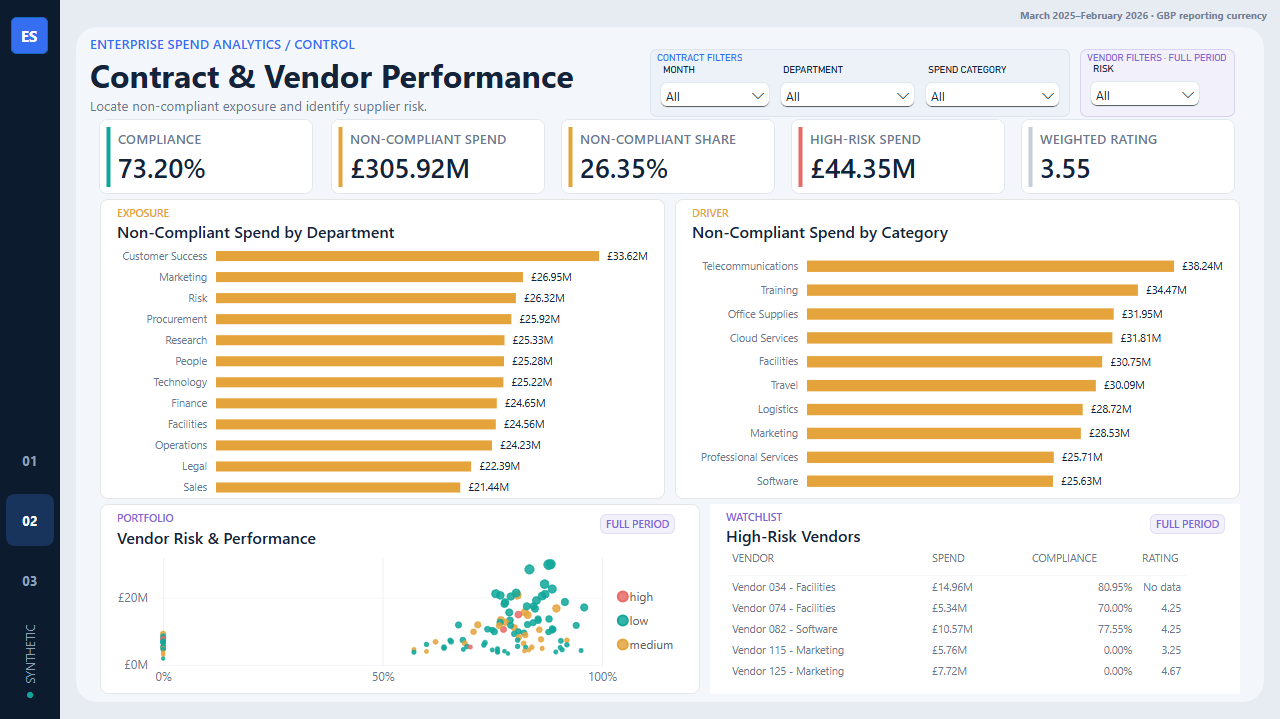
£305.92m is non-compliant spend. No active matching contract is the largest cause at £116.95m. Seven high-risk vendors account for £44.35m.
Non-compliance is not one problem. Contract coverage and high-risk vendor performance require different controls.
Prioritise contract matching and coverage, then review the seven high-risk vendors separately.
Why this visual exists. Duration, SLA breaches, priority, and department are combined to separate slow flow from service failure.
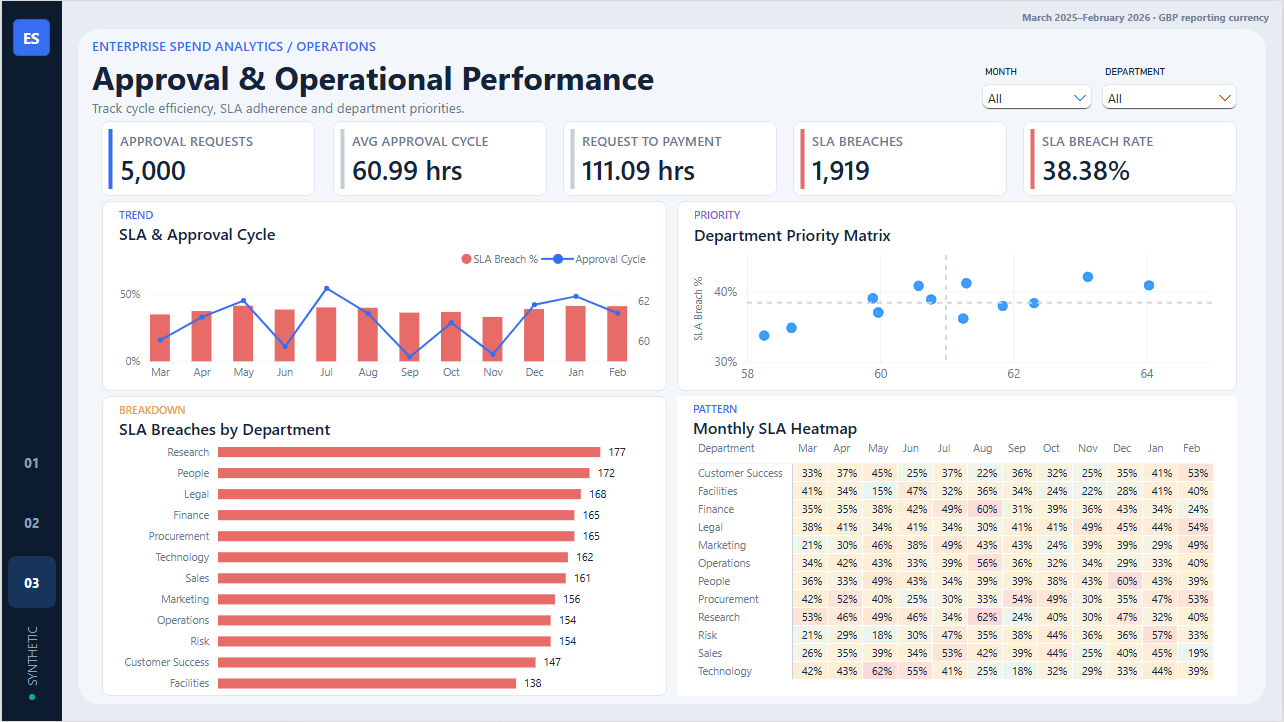
Procurement has the longest mean approval cycle at 64.04 hours. Research has the highest SLA breach rate at 42.04%.
The departments show different failure patterns. Mean duration and breach rate are not interchangeable.
Investigate workflow delay in Procurement and SLA control in Research. Do not apply one response to both.
Why this visual exists. The Power BI monitoring page places load recency, rule coverage, recent runs, and rule-level evidence beside the governed business report.
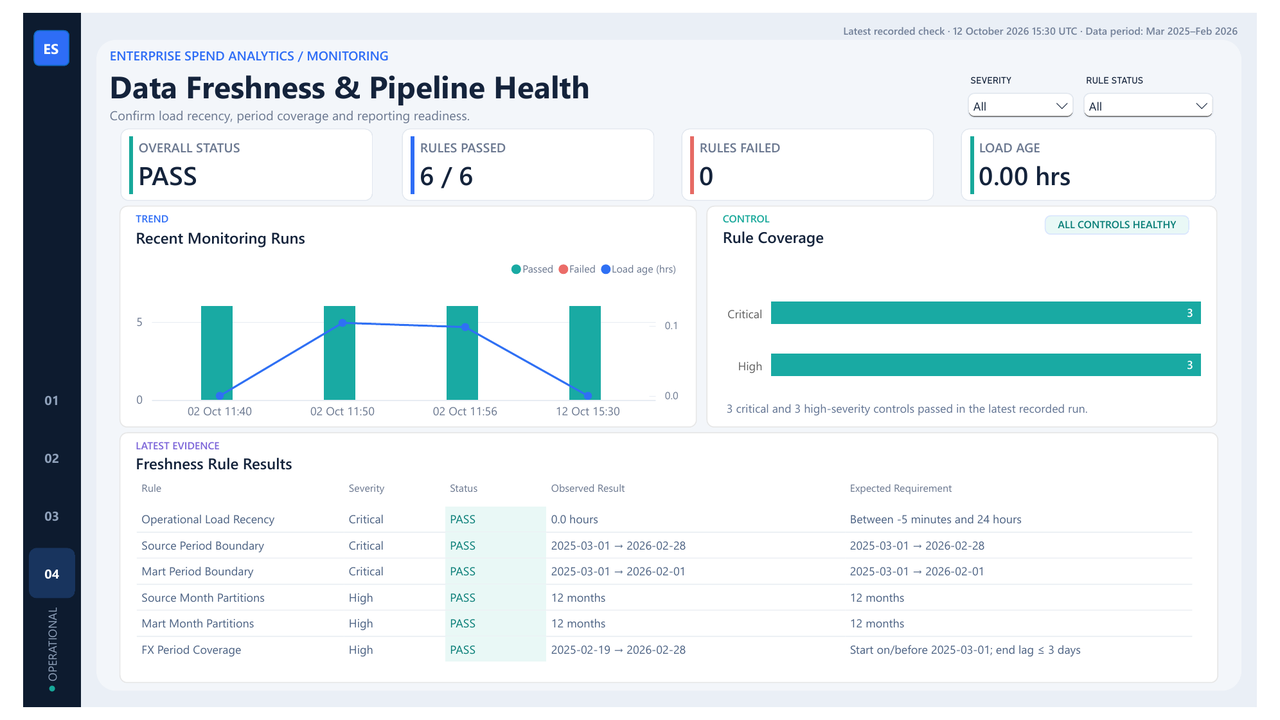
The latest recorded check passed all six freshness rules with zero failures and a 0.00-hour load age.
The page confirms reporting readiness at the recorded check time. It is an imported audit snapshot, not a live service guarantee.
Confirm the six control results before using the business pages. Use Grafana when near-real-time operational refresh is required.
Why this visual exists. Grafana combines overall status, load age, rule results, recent runs, and failure history in one operational view.
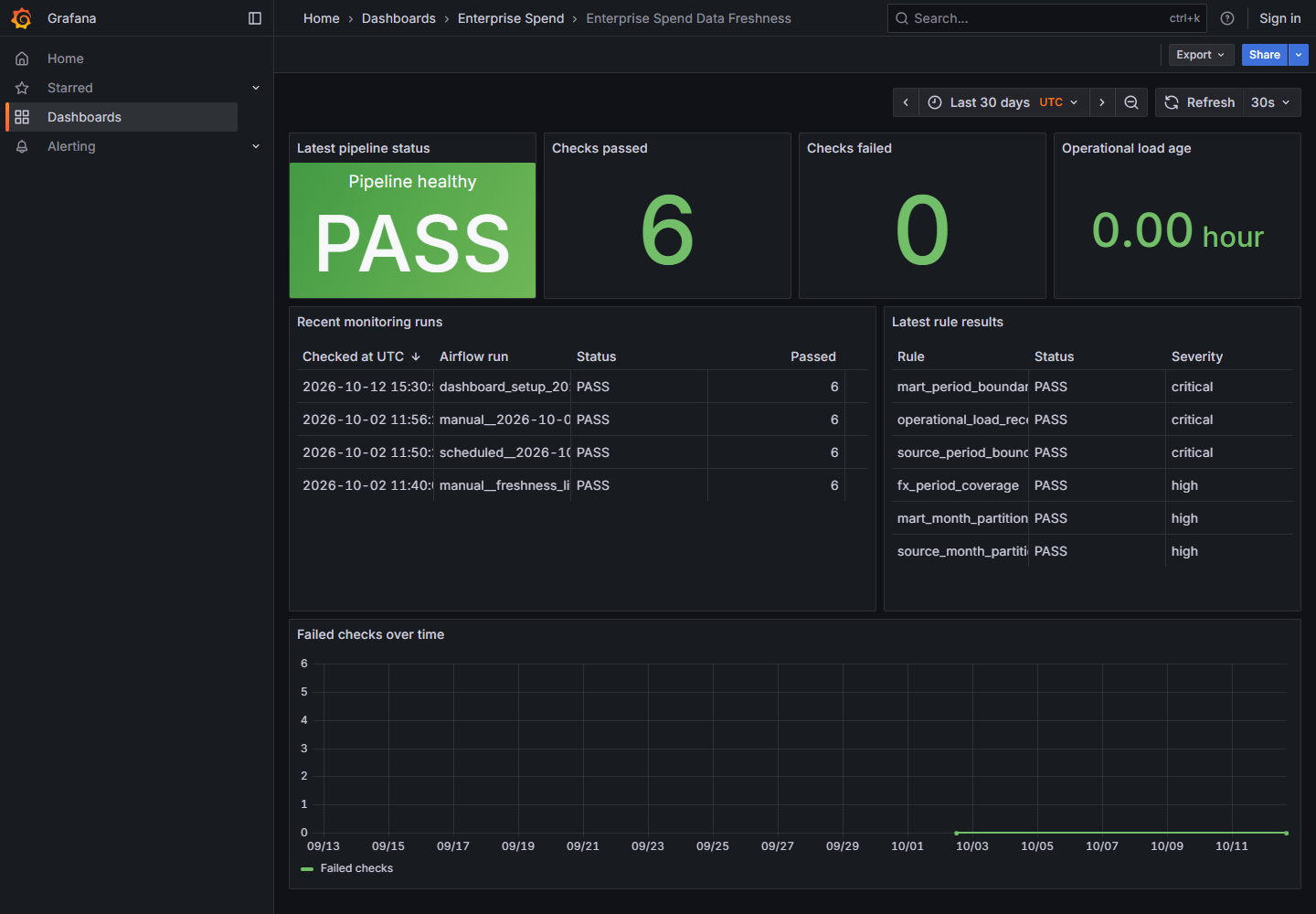
The first live setup check detected an operational load age of 243.662 hours. After a controlled reload, the latest run passed all six rules with zero failures.
The monitor detects stale delivery without treating the fixed historical business period as a live-feed failure.
Pause use when a critical rule fails. Refresh the controlled load, rerun the checks, and confirm recovery before reporting continues.
Why this visual exists. Streamlit provides a lightweight Python view of the same governed MySQL monitoring contract.
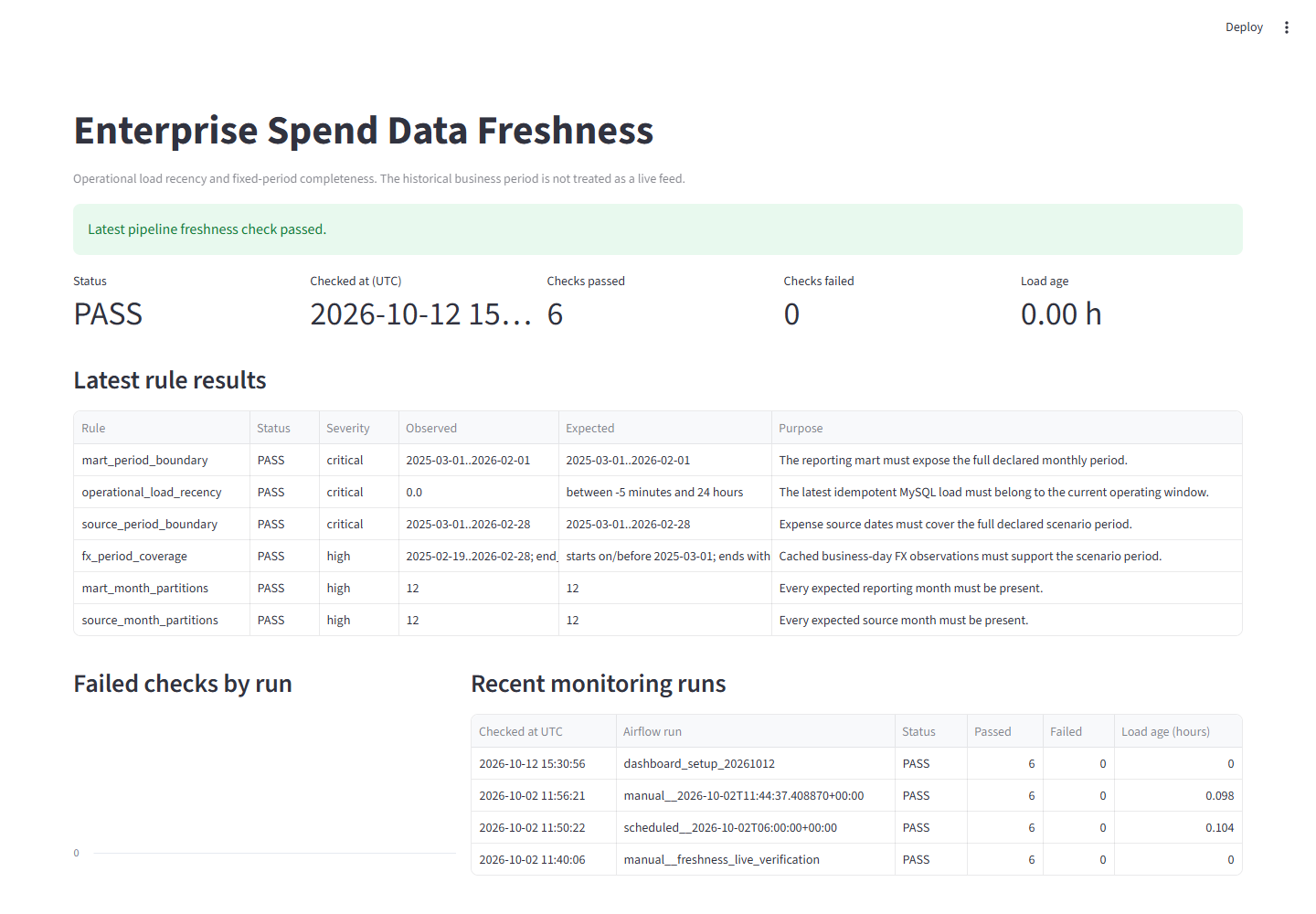
The application query returned PASS, six passed rules, zero failed rules, and six rule-level evidence rows.
Grafana and Streamlit do not calculate freshness independently. Both read four shared, read-only MySQL views.
Use Grafana for continuous local operations and Streamlit for transparent inspection and demonstration.
Source: original Power BI, Grafana, and Streamlit screenshots from the project repository. Figures use the project dataset and evidence boundaries stated above.
Evidence
The case study must show both the analytical result and the checks that support it.
dbt tests check model quality.
Reconciliation checks compare records and totals.
Freshness rules passed after failure detection and controlled recovery.
The loader runs twice and compares row counts. It stops the pipeline if a rerun changes the result.
first_counts = load_once(connection, project_root)
report = {"first_run_counts": first_counts}
if args.verify_idempotency:
    second_counts = load_once(connection, project_root)
    report["second_run_counts"] = second_counts
    report["idempotency_verified"] = first_counts == second_counts
    if not report["idempotency_verified"]:
        raise RuntimeError("Row counts changed on rerun")
First load → second load. Row counts and the reconciled GBP total remained unchanged.